
Enterprise document management suiteEvery document, from first view to final signature.
Viewing, forms, generation, contracts, e-signature and workflow. Six products on one platform, in our cloud or yours.
0 installs
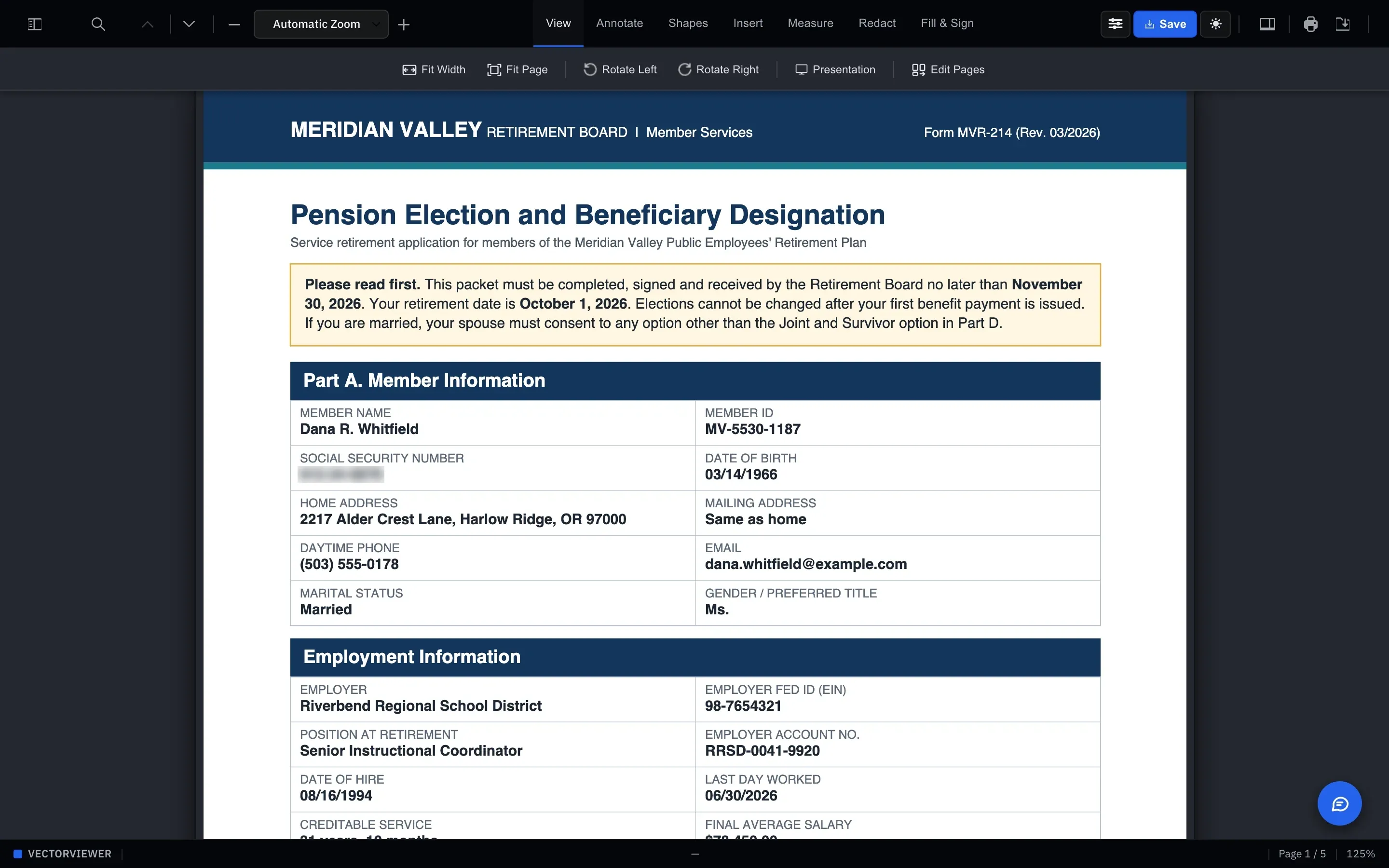
everything runs in the browser
30+
file formats rendered in the browser
1 engine
under all six products
Since 2019
building document infrastructure
Most companies run their documents on four or five vendors. One renders the PDF. Another handles the form. A third collects the signature, and a fourth tracks the contract. Each has its own login, its own audit log and its own invoice, and someone on your team spends their week copying files between them.
We started VectorViewer in 2019 to fix that from the bottom up. Instead of bolting tools together, we built one PDF engine and put every product on top of it. A document that’s generated in VectorGen is the same file you review in VectorViewer and sign in VectorSign. Nothing gets exported, re-uploaded or re-keyed along the way.
Each product also runs as its own microservice with a standard API. You can use one of them inside your application today and add the rest later, without rewriting anything. Most teams start with a single workflow and go live within weeks.
Six products. Use one, or run all of them.
They share one engine, one dashboard and one way of doing permissions, so the second product is far easier than the first.
View, annotate, redact
VectorViewer
Open PDF, Word, Excel, PowerPoint, TIFF and 25+ other formats right in the browser. Nothing to install, nothing to patch.
- Highlights, sticky notes, stamps and threaded comments
- Redaction for sensitive text and images
- Side-by-side version compare
Explore VectorViewer →
Fillable forms
VectorForms
Upload the paper form you already use. VectorForms maps the fields, and you add the rules.
- Required fields, calculations and conditional logic
- Routing to the right reviewer based on answers
- Drag-and-drop editor, plus custom JavaScript
Explore VectorForms →
Document generation
VectorGen
Send the data once and get back ready-to-file PDFs. Filing season shouldn’t mean manual assembly.
- W-2, 1099-MISC, 1099-R, 1096, 1040, 941, 940
- Statements and benefits notices on your own templates
- One document or a whole year-end run, same API
Explore VectorGen →
Contract lifecycle
VectorCLM
Eleven stages, from the first request to the final archive, in one tracked system.
- Internal review and approval before anything goes out
- Counterparties negotiate from a link, no login
- Renewal alerts before a contract quietly expires
Explore VectorCLM →
E-signature
VectorSign
Everything you expect from e-signature, without the per-envelope bill you’ve come to dread.
- Signer authentication included, not an add-on
- Tamper-evident audit trail on every signature
- Standalone app or embedded in yours
Explore VectorSign →
Workflow builder · Preview
VectorFlow
Chain the other five products into the process your business actually runs. No code.
- Visual builder for stages, approvals and hand-offs
- Industry templates, like a home closing
- See every case’s stage, next owner and where it’s stuck
Explore VectorFlow →
The platform
Six products. One engine underneath.
Plenty of document suites are separate tools sold under one name. Ours was built as one system from the start, so a document keeps the same file, the same permissions and the same history as it moves from product to product.
- One engineRendering, forms and generation run on the same PDF engine, so a document never changes format between products.
- One dashboardUsers, permissions, theming and white-labelling are set once and apply across the suite.
- One way to integrateEvery product has a standard API and runs as its own service, so you can start with one.
Products
Shared across the suite
Engine
Runs on AWS
New in VectorViewer
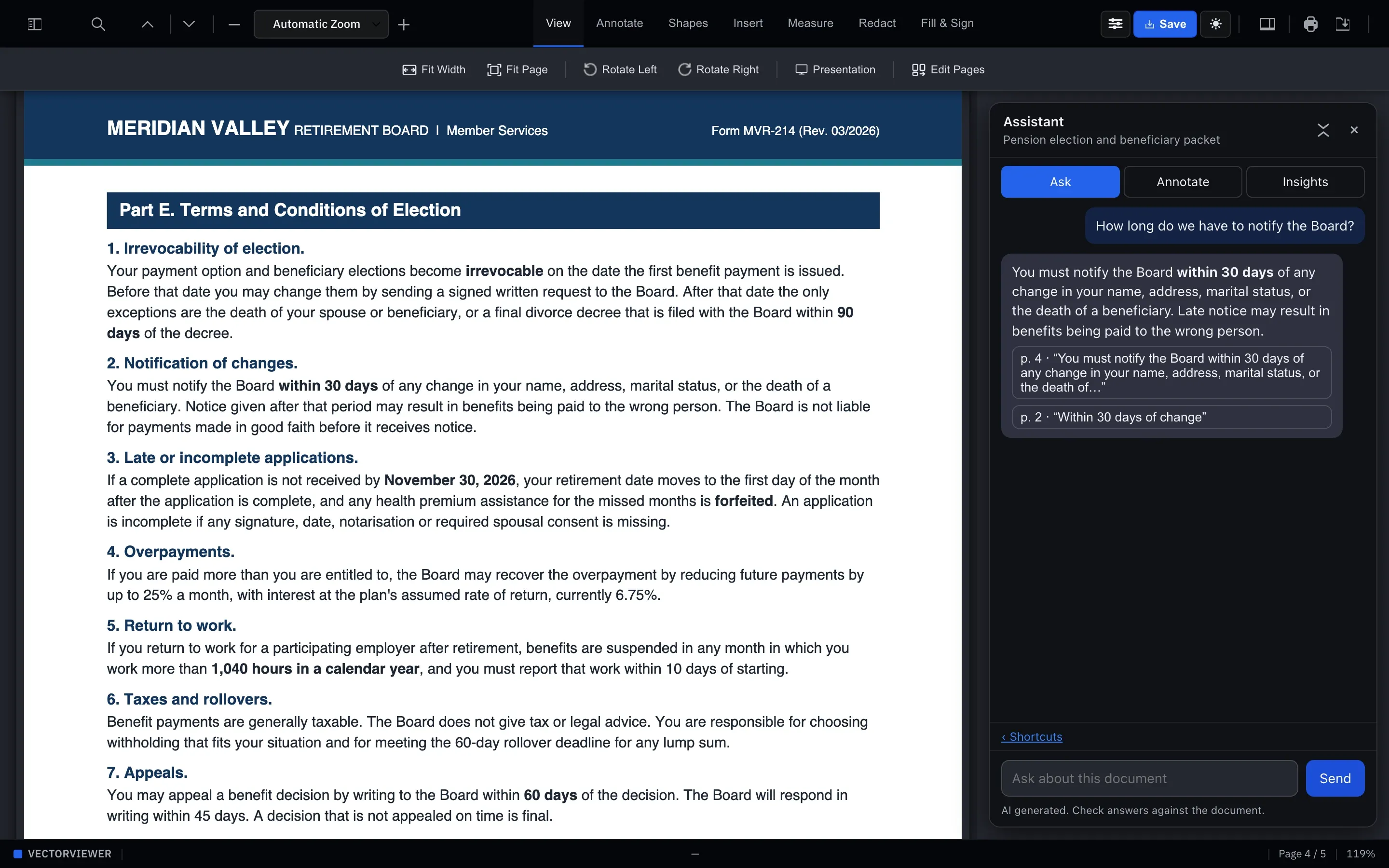
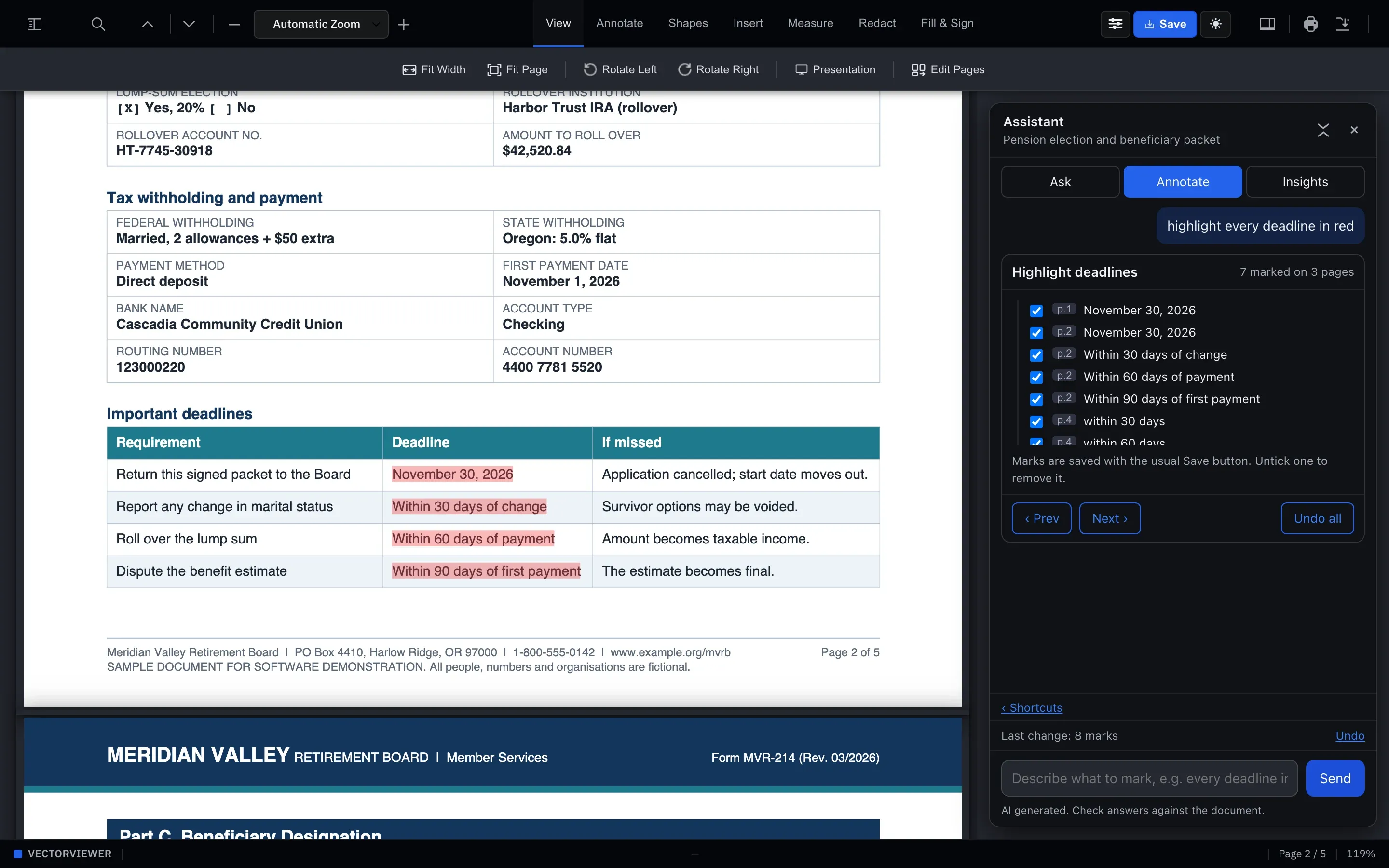
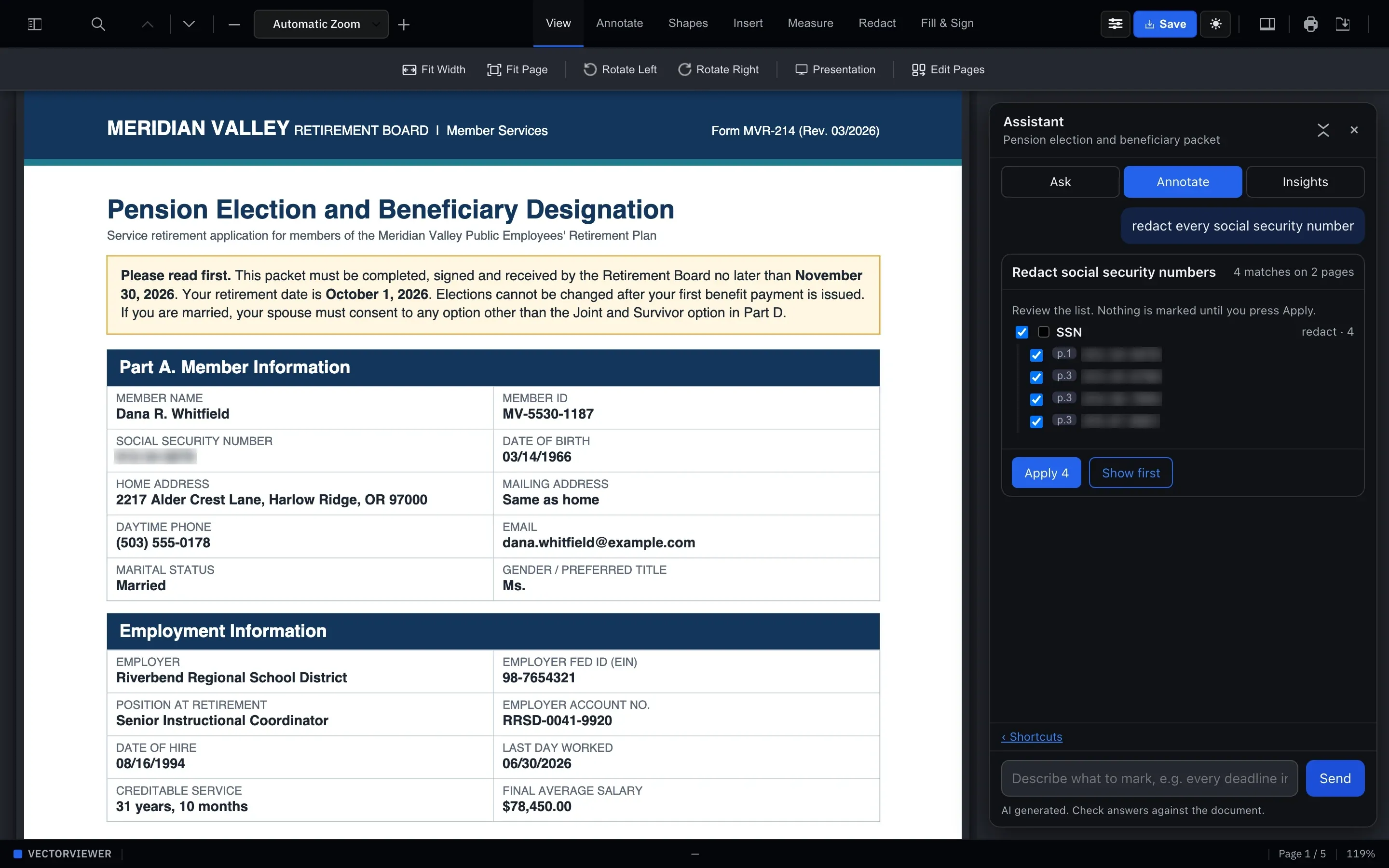
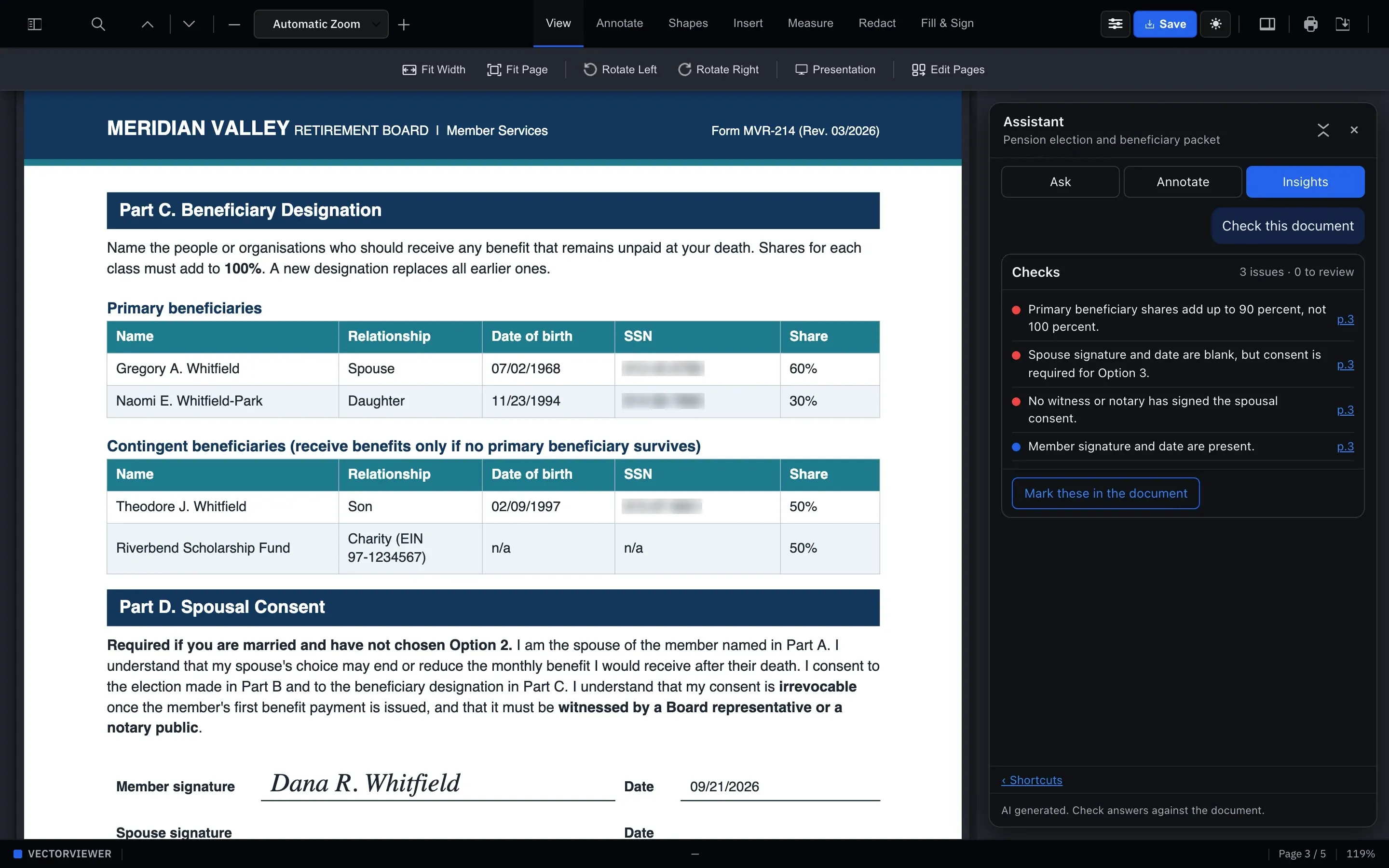
An assistant that reads the document with you.
Ask a question about a 90-page agreement and get an answer that points to the page it came from. Select a clause and ask what it means. Have it find every name, date and account number that needs redacting.
It suggests; you decide. Nothing gets marked until you press Apply, and every answer is labeled so reviewers know to check it against the source. Admins can switch the assistant on or off for each client and environment.
Highlight key obligations
Flag renewal terms
Prepare a release copy
Color-code amounts, dates and names
What it looks like in practice
A home purchase: twelve steps, five products, one file.
A lender configures this once in VectorFlow. After that, every buyer, seller, underwriter and title agent works from the same record, and nobody has to ask where the latest version is.
Not buying a home? Start from one of these.
Five starter workflows cover the most common jobs. Each one is a starting point. Change the steps, the rules and the reviewers until it matches how your team really works.
Forms Flow
Send a prefilled form, get it back signed and verified.
Document Flow
Upload, review, comment and keep every version.
Contract Life Cycle
Request, draft, negotiate, sign and renew.
Digital Signature
Upload, add signers, send, done. Audit trail included.
Document Generator
Data in through the API, ready-to-file PDF out.
The details your security team will ask about.
Documents are where the sensitive stuff lives. We built the controls in from the start, not as a premium tier.
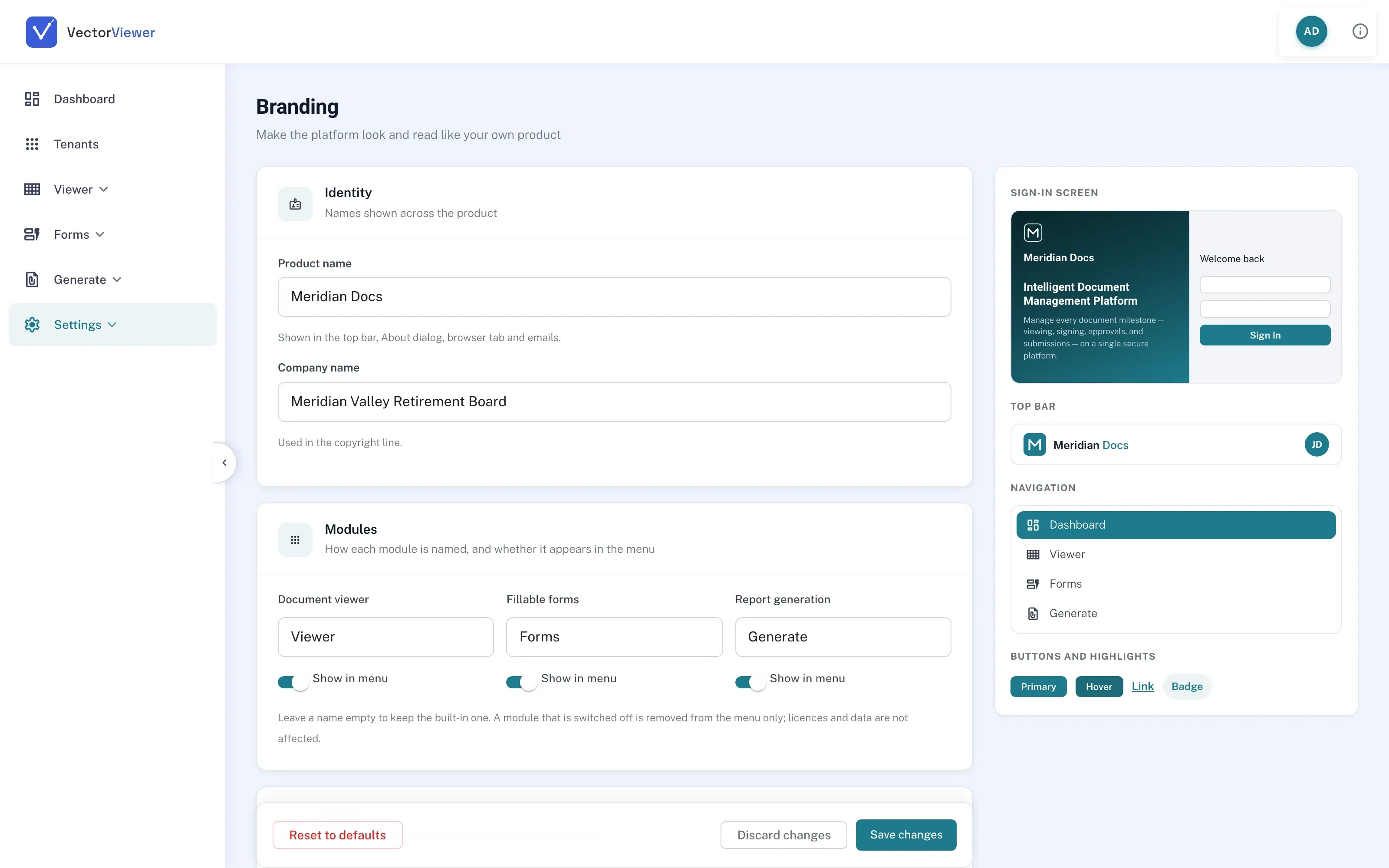
New client dashboard
One deployment. Every client, its own brand.
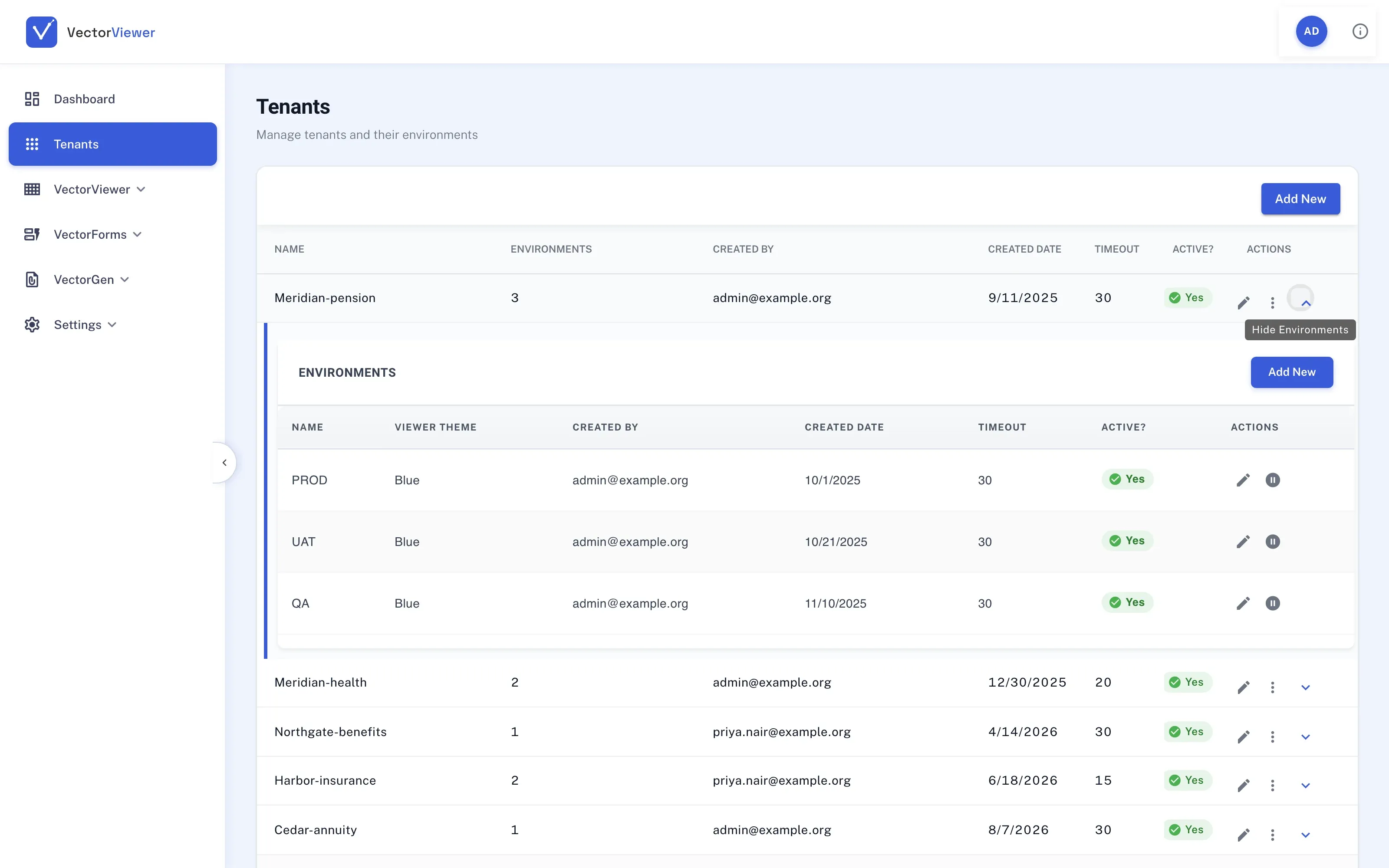
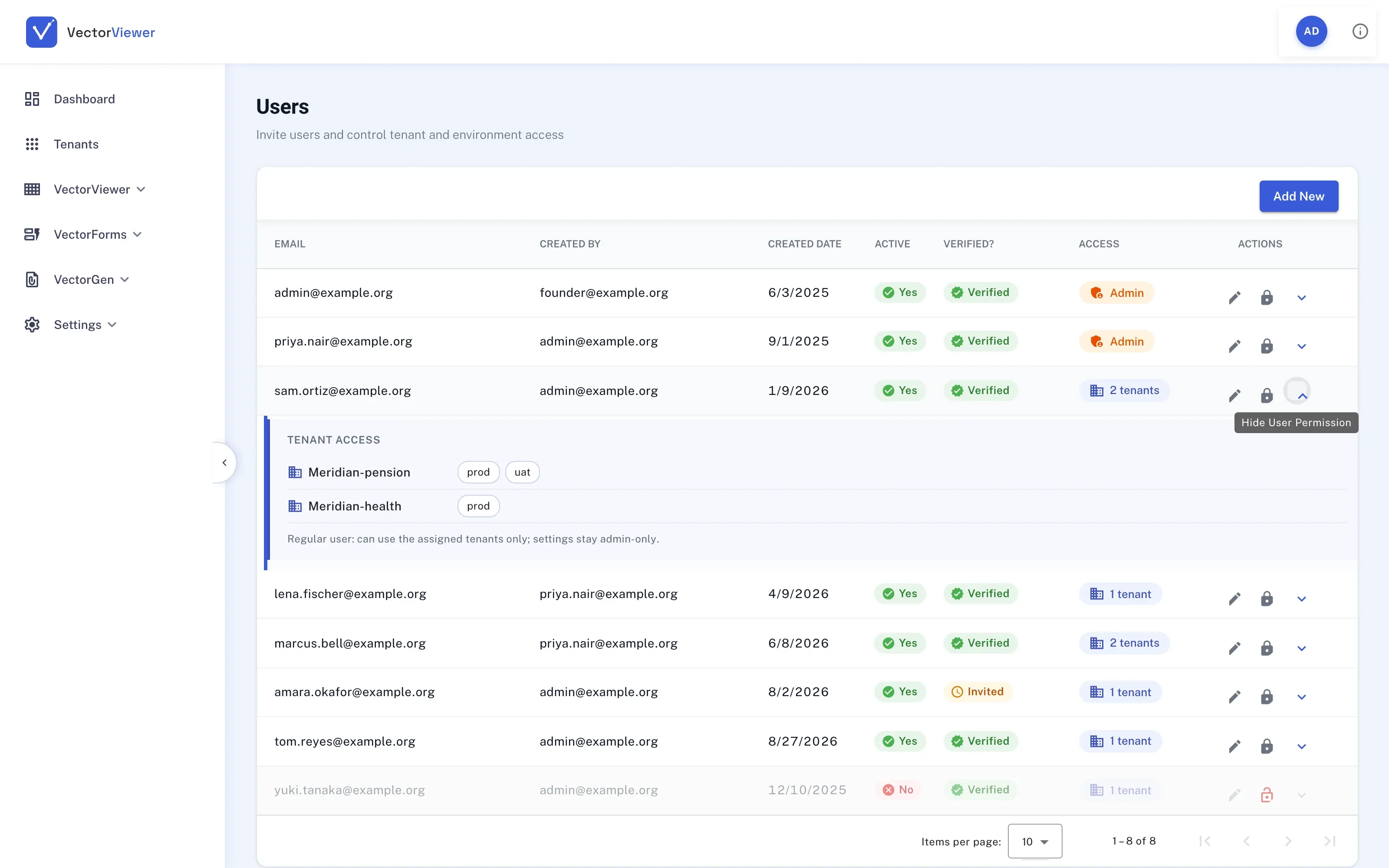
If you serve many organizations, you shouldn’t need a separate installation for each one. The client dashboard lets a single deployment host as many clients as you have, and each of them gets a product that looks like it was built just for them.
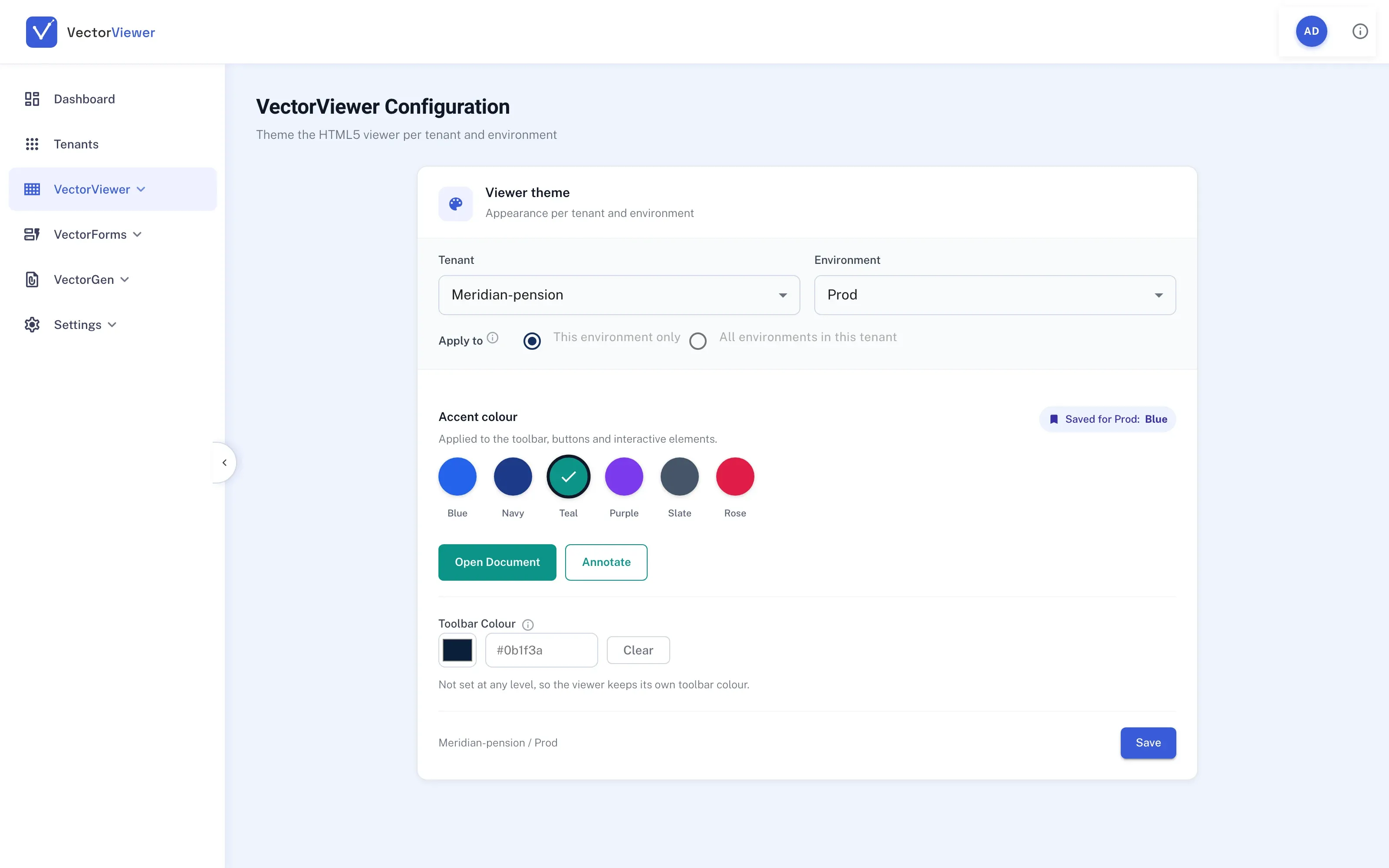
Rename the product and its modules, put the client’s name on the sign-in screen, and pick their colors. The live preview shows exactly what their users will see before you save. On-prem clients can white-label it completely.
Built for industries that live on paperwork.
Insurance →
Claims intake, policy forms, signed disclosures
Financial Services →
Account opening, statements, loan files
Legal →
Contracts, redlines, redaction before production
Healthcare →
Intake and consent forms, records review
Government →
Public forms, permits, records requests
Retirement Systems →
Member forms, 1099-Rs, benefits notices
Education →
Enrollment, financial aid, staff paperwork
Real Estate →
Purchase agreements, disclosures, closings
HR & Payroll →
I-9s, onboarding packets, W-2s at year end
SaaS
Sign up today. Start this afternoon.
Multi-tenant from the ground up, with one dashboard for usage, auditing and configuration across every client. There’s no separate infrastructure for you to stand up or maintain.
See pricingPrivate cloud
Your AWS account. Your brand.
Our deployment tooling installs the full suite in your own environment. The client dashboard lets you white-label it end to end, for teams whose documents can’t leave the building.
Talk to us about private cloudA note from the people who built it.
Before VectorViewer, I spent twenty years building document and content management systems for large enterprises. The same problem came up on every project. The viewer, the forms tool, the signing service and the archive never quite agreed with each other, and the people using them paid for it.
So we built the thing we always wanted: one engine, six products, simple APIs, and a user interface we’re not embarrassed to put in front of your customers. If you’d like to see it on your own documents, I’d be glad to show you.
Pradeep Padanthaya
Co-founder & CEO
2019
Founded to build one PDF engine for viewing, forms and signature.
2023
Private cloud opens on AWS. Clients run the full suite in their own environment.
2025
VectorGen launches, bringing compliance document generation into the suite.
2026
VectorFlow, the sixth product, opens in preview, tying the other five together.
- More about the company →
Questions we hear a lot.
Got one that isn’t here? Ask us directly. A person will answer.
Why an HTML5 viewer instead of a PDF plug-in?
Plug-ins have to be installed, updated and supported on every machine. VectorViewer runs in any modern browser on any device, so there’s nothing for IT to roll out and nothing to patch.
Can you turn our existing PDFs into fillable forms?
Yes. Upload the PDF and VectorForms maps its fields automatically. You then adjust the mapping and add rules. You can also build a form from a blank page.
Are VectorSign signatures legally enforceable?
VectorSign records signer authentication and a tamper-evident audit trail, which are the things ESIGN and UETA generally look for. Enforceability still depends on the document and jurisdiction, so check with counsel for high-stakes agreements.
How is VectorCLM different from a contract folder?
A folder stores contracts. VectorCLM runs them: intake, drafting, internal approval, external negotiation, signature, then tracking of obligations and renewal dates, with alerts before anything expires.
SaaS or private cloud?
SaaS is the fastest way to start. Private cloud is for teams that need documents to stay in their own AWS environment, or want to offer the suite under their own brand. Same product either way.
Do we have to buy all six?
No. Every product works on its own. Plenty of clients start with just VectorViewer or VectorSign and add the others when they’re ready.
Bring your documents. We’ll show you the rest.
Send us a form, a contract or a stack of PDFs before the call, and we’ll walk through them live.